Documentation
The Problem
The underlying problem in IT Project Management is twofold:
- The Communication Problem - The lack of a common semantic language.
- The Imagination Problem - The users cannot visualize the final product with interaction etc.
The Communication Problem
The users and customers cannot express their wishes and desires in a language that the developers unambiguously understand and are able to implement.
The users and customers lack a common language to express and explain to the developers what they want the IT system to do and look like.
On the other hand, the users and customers are not capable of drafting or even understanding a detailed technical description (requirement specification).
The Imagination Problem
Even if the users and developers are successful in communication, the users cannot imagine the final result to an extend that it is realistic that the users will not change mind or elaborate their requirements when testing the final deveoped IT system.
The Solution
The solution is to establish a common language, that both users and customers on one side and developers on the other side fully understand.
And secondly, a framework that is easily configurable, when the users change mind when seeing and trying the final product.
The Philosophy
The basic idea is to make a simple framework being component based, scalable open and fast. The keyword is productivity.
Scalable
If you dont need a database for your project, the framework will not enforce you to install a database. Etc. Your code will stay at an equavalent complexity to your project complexity.
Open - The C Assembly Trick
One of the major reasons for C being the most successful programming language is the very special feature of allowing you to "step down" to assembler level. This framework adopts the same philosophy by allowing you to always "step down" and write in the underlying language, be it HTML, JavaScript, CSS, XSL, PHP, etc.
This framework is not taking possibilities from you, but adding a macro level - hopefully - making it much more fast to develop web applications. You may write the Bootstrap classes direct. Write the inline @styles. Add inline Javascript. We are making it CSP compliant... Add the attribute markup from this framework directly to HTML tags. Make the HTML conditional by making it up with @lang, @role, @publish, etc.
Full Stack - 5th Generation Language
- Machine Code - Bits and Bytes
- Assembly - Characters, Digits and Commands
- Symbolic Algebra & System Theory - Scoped Variables, Functions, Classes and Objects
- Declarative and Specialized Languages
- One Language for the Full Stack
Directory Structure
Site Root
__system__ directory
This is the system folder with all resources needed to run the system. Under normal circumstances there is no need to modify anything in this folder on a project level.
_setup directory
_pages directory
_directory defines the header and menu structure and links to all the page files. Sub folders defines the next level of the site structure; each folder must have its own _directory.xml
Generally speaking, it is not allowed to add files with the same page name but any other file extension, like .xsl, .xsd etc., as such files might have special meaning.
_manifest directory [optional]
_api directory [optional]
Other directories [optional]
__sessions directory [auto]
Temporary user data saved in folders named by session ID.
__accounts directory [auto]
Temporary user data saved in folders named by accountID.
Query Parameters
| Parameter | Purpose | Datatype | Preserved |
|---|---|---|---|
| p=0 | Show server load time | 0 | |
| p=1 | Javascript debugging | 1 | browser |
| p=2 | Logging, save temp files, etc. | 2 | browser |
| compile=true | compile | boolean | browser |
| lang | language setting | ISO lang code | cookie |
| region | regional setting | ISO country code | cookie |
| decimal | decimal separator | comma | dot | cookie |
| thousand | thousand grouping separator | comma | dot | space | apostrophe | cookie |
| datetime | datetime format | US [MM-DD-YYYY 12:00 AM] | EU [DD-MM-YYYY 24:00:00] | W3C [YYYY-MM-DDT24:00:00] | cookie |
| timezone | timezone setting | ISO [-]HH[:mm] | cookie |
| calendar | calendar system | christian | buddhist [+543] | muslim [-579] | cookie |
| currency | currency setting | ISO currency code | cookie |
| editor | show editor menus | true | session |
| contenteditable | make text editable | true | browser |
| state | conditional showhide | {any} | |
| task | conditional showhide | {any} | browser |
| role | conditional showhide [lower roles only] | {any} | browser |
| profile | conditional showhide [lower profiles only] | {any} | browser |
| csp=false | Content Security Policy [role=9 only] | false | browser |
| fp=false | Feature Policy [role=9 only] | false | browser |
| action=sitemap | create/update sitemap.xml | string | browser |
| action=clear | clear all table parameters | string | browser |
| action=files | create xml file listing all site files | string | browser |
| action=sessions | Delete all sessions more than 24 hours old | string | browser |
| action=logs | Delete all log files more than 24 hours old | string | browser |
| mode=html&export=wp | export to WordPress | string | browser |
Basic Files
All projects will have at least 2 custom files:
- _directory.xml - shared header, footer, etc.
- {page}.xml - page definition
Most project will so have 2-3 files more:
- setup.xml - login system, etc.
- model.xml - relational database model
- {service}.xml - backend service
The _setup/setup.xml file
<?xml version="1.0" encoding="UTF-8"?>

−
<site xmlns:bs-e="http://www.bootstrap-extensions.org" xmlns:ds="http://www.bootstrap-data.org" xmlns:sql="http://www.rapidweb.tools/sql">

<login system="db" retries="3"/>


</site>


[1 lines]
The _directory.xml file
_pages folder being the root directory of your web site. The _directory.xml file defines the shared header, footer, menus, etc. of each directory. Additional subdirectories addes as folders to the _pages root folder. Each subdirectory needs a _directory.xml file. You may add subdirectories to the subdirectories
endlesly.The root tag must be <bs:document>
There is a special attribute @dir to indicate if the _directory.xml of a sub folder should inherit from the _directory.xml files from parent levels. @dir="0" means no inheritage. Omitted @dir attribute means inherit up till root _directory.xml. Other numbers indicate how many levels upwards should be inherited.
There is a special tag <bs:import> to indicate where the {page}.xml files are to be imported.
<?xml version="1.0" encoding="UTF-8"?>

−
<bs:document dir="0" xmlns:bs="http://www.bootstrap-cms.org" xmlns:bs-e="http://www.bootstrap-extensions.org" xmlns:ds="http://www.bootstrap-data.org" xmlns:sql="http://www.rapidweb.tools/sql">


−
<bs:head>


<bs:title>Home</bs:title>

 Here is your title, keywords, custom css and scripts and other head information defined.


</bs:head>


[1 lines]


−
<bs:body>

 Here is your content...
<bs:import/>


</bs:body>


[1 lines]


</bs:document>


[4 lines]


Home Here is your title, keywords, custom css and scripts and other head information defined.  Here is your content...
The {page}.xml files
{page}.xml files. One file one page.The root tag must be <bs:page>. It has no visual impact.
There is a special tag <bs:include @scr="{file}.xml"> for including other files as resources.
<?xml version="1.0" encoding="UTF-8"?>


<bs:page xmlns:bs="http://www.bootstrap-cms.org" xmlns:bs-e="http://www.bootstrap-extensions.org" xmlns:ds="http://www.bootstrap-data.org" xmlns:sql="http://www.rapidweb.tools/sql"> Here is your content... </bs:page>


 Here is your content...
<?xml version="1.0" encoding="UTF-8"?>

−
<bs:page xmlns:bs="http://www.bootstrap-cms.org" xmlns:bs-e="http://www.bootstrap-extensions.org" xmlns:ds="http://www.bootstrap-data.org" xmlns:sql="http://www.rapidweb.tools/sql">


−
<bs:head>


<bs:title>Home</bs:title>

 Here is your title, keywords, custom css and scripts and other head information overwriting _directory.xml


</bs:head>


[1 lines]


−
<bs:body>

 Here is your content...
<!--<bs:include src="content.xml"/>-->


</bs:body>


</bs:page>


[3 lines]


Home Here is your title, keywords, custom css and scripts and other head information overwriting _directory.xml  Here is your content...
The _setup/database/db/_uploads/model.xml file
The relational database model definition.
<?xml version="1.0" encoding="UTF-8"?>

−
<rd:database historyDefault="true" auditDefault="true" privilegeDefault="true" localsDefault="true" versioningDefault="true" rowlockDefault="true" locationDefault="true" surveyDefault="true" xmlns:bs-e="http://www.bootstrap-extensions.org" xmlns:ds="http://www.bootstrap-data.org" xmlns:sql="http://www.rapidweb.tools/sql" xmlns:rd="http://www.rapidweb.tools/db">


<rd:include type="system" href="builtin/lang/metadata.xml"/>


−
<rd:table name="ACCOUNT" history="true" versioning="false" priority="10">


<rd:column name="ACCOUNTNAME" type="@TEXT"/>


<rd:column name="ACCOUNTTYPE" datatype="INTEGER" length="1"/>


</rd:table>


[2 lines]


</rd:database>


[4 lines]
The _service/{service}.xml file(s)
<?xml version="1.0" encoding="UTF-8"?>


<transaction xmlns:bs="http://www.bootstrap-cms.org" xmlns:bs-e="http://www.bootstrap-extensions.org" xmlns:ds="http://www.bootstrap-data.org" xmlns:sql="http://www.rapidweb.tools/sql"> Transaction flow goes here </transaction>


 Transaction flow goes here
Installation
Simple Install
- Download bsml.zip and setup.php
- Copy bsml.zip and setup.php to site root directory
- Type address to setup.php in your browser
- Follow the online instructions
WordPress Install
HTML
The idea is to create a semantic vocabulary.
Some tags are highly one to one as the starting point. Ex. if you write <bs:form>, then it writes an HTML <form> tag.
Other tags do not exist in HTML, fx. <bs:carousel>. Then the needed HTML is written to make a Carousel.
CSS
It is 99% Bootstrap 5 based - only with a very few extensions.
However, you do not have to add the Bootstrap CSS classes manually as the basic classes are added by the semantic tags including default margins, paddings, etc..
But you can still add classes like 'p-3' etc. either by the @class attribute or by semilary semantic markup like @padding="3". If those are set as defaults already, the default will be overwritten.
Javascript
The basic idea is to activate Javascript by HTML attribute markup the same way as it is being done in Bootstrap. Fx. @data-bs-toggle and @data-bs-target are used for navigating a tabpanel.
However, you do not have to add those attributes. Instead it is included by the semantic markup.
<?xml version="1.0" encoding="UTF-8"?>
−
<bs:carousel prev="true" next="true" xmlns:bs="http://www.bootstrap-cms.org" xmlns:bs-e="http://www.bootstrap-extensions.org" xmlns:ds="http://www.bootstrap-data.org" xmlns:sql="http://www.rapidweb.tools/sql">
−
<bs:seat>
<bs:h1>Fast</bs:h1>
</bs:seat>
[1 lines]
−
<bs:seat>
<bs:h1>And Easy</bs:h1>
</bs:seat>
[1 lines]
</bs:carousel>
[4 lines]
Fast And Easy
<?xml version="1.0" encoding="UTF-8"?>
−
<div id="D25idm781" data-bs-ride="carousel" data-bs-touch="true" class="carousel slide mx-auto" xmlns:bs="http://www.bootstrap-cms.org" xmlns:bs-e="http://www.bootstrap-extensions.org" xmlns:ds="http://www.bootstrap-data.org" xmlns:sql="http://www.rapidweb.tools/sql">
−
<div class="carousel-inner d-flex h-100 text-center">
−
<div data-bs-interval="5000" class="carousel-item">
−
<div>
<h1>Fast</h1>
</div>
[1 lines]
</div>
[2 lines]
−
<div data-bs-interval="5000" class="carousel-item active">
−
<div>
<h1>And Easy</h1>
</div>
[1 lines]
</div>
[2 lines]
</div>
[6 lines]
−
<button type="button" class="carousel-control-prev" data-bs-target="#D25idm781" data-bs-slide="prev">
<span class="carousel-control-prev-icon" aria-hidden="true"/>
<span class="visually-hidden">Previous</span>
</button>
[2 lines]
−
<button type="button" class="carousel-control-next" data-bs-target="#D25idm781" data-bs-slide="next">
<span class="carousel-control-next-icon" aria-hidden="true"/>
<span class="visually-hidden">Next</span>
</button>
[2 lines]
</div>
[13 lines]
<bs:document/>
_directory.xml file
<?xml version="1.0" encoding="UTF-8"?>

−
<bs:document xmlns:bs="http://www.bootstrap-cms.org" xmlns:bs-e="http://www.bootstrap-extensions.org" xmlns:ds="http://www.bootstrap-data.org" xmlns:sql="http://www.rapidweb.tools/sql">


<bs:head></bs:head>


<bs:body></bs:body>


</bs:document>


[2 lines]
Connect to page
<?xml version="1.0" encoding="UTF-8"?>

−
<bs:document xmlns:bs="http://www.bootstrap-cms.org" xmlns:bs-e="http://www.bootstrap-extensions.org" xmlns:ds="http://www.bootstrap-data.org" xmlns:sql="http://www.rapidweb.tools/sql">


<bs:head></bs:head>


−
<bs:body>

<bs:import/>


</bs:body>


[1 lines]


</bs:document>


[3 lines]
<bs:page/>
{pagename}.xml file
<?xml version="1.0" encoding="UTF-8"?>

−
<bs:page xmlns:bs="http://www.bootstrap-cms.org" xmlns:bs-e="http://www.bootstrap-extensions.org" xmlns:ds="http://www.bootstrap-data.org" xmlns:sql="http://www.rapidweb.tools/sql">


<bs:head></bs:head>


<bs:body></bs:body>


</bs:page>


[2 lines]
<bs:include src=""/>
<?xml version="1.0" encoding="UTF-8"?>

−
<bs:page xmlns:bs="http://www.bootstrap-cms.org" xmlns:bs-e="http://www.bootstrap-extensions.org" xmlns:ds="http://www.bootstrap-data.org" xmlns:sql="http://www.rapidweb.tools/sql">


<bs:head></bs:head>


<bs:body> <bs:include/> </bs:body>


</bs:page>


[2 lines]


 <bs:include/>
<bs:component/>
<?xml version="1.0" encoding="UTF-8"?>

−
<bs:component xmlns:bs="http://www.bootstrap-cms.org" xmlns:bs-e="http://www.bootstrap-extensions.org" xmlns:ds="http://www.bootstrap-data.org" xmlns:sql="http://www.rapidweb.tools/sql">

−
<bs:input>

<bs:label>Input Control</bs:label>


</bs:input>


[1 lines]


</bs:component>


[2 lines]


Input Control
<bs:text>
10-05-2020
<?xml version="1.0" encoding="UTF-8"?>


<bs:text datatype="date" xmlns:bs="http://www.bootstrap-cms.org" xmlns:bs-e="http://www.bootstrap-extensions.org" xmlns:ds="http://www.bootstrap-data.org" xmlns:sql="http://www.rapidweb.tools/sql">2020-05-10</bs:text>


2020-05-10
Attributes
| Attribute | Datatype | Description |
|---|---|---|
| @select | xs:string | XPath select |
| @datatype | xs:string with enumeration | converts value to datatype |
| @std-id | xs:string | standard text ID |
| @escape | xs:boolean [false] | xml escape |
| @whitespace | [preserve | trim | normalize] | correct whitespaces |
| @case | @autocapitalize | [uppercase | lowercase | camelcase] | letter case |
| @formatting | xs:string | |
| @localize | [ISO | EU | US] or [dot | comma] | |
| @thousands | xs:boolean [true] | |
| @decimals | xs:nonNegativeInteger | 2 |
| @showTimezone | xs:boolean [false] | |
| @timezone | (+|-)HH:mm or [server | region | local | user | none] | |
| @min | xs:datetime | |
| @max | xs:datetime | |
| @date-separator | xs:string | - |
| @time-separator | xs:string | : |
| @datetime-separator | xs:string | T |
Childs
<lang>
English
<?xml version="1.0" encoding="UTF-8"?>
−
<bs:text xmlns:bs="http://www.bootstrap-cms.org" xmlns:bs-e="http://www.bootstrap-extensions.org" xmlns:ds="http://www.bootstrap-data.org" xmlns:sql="http://www.rapidweb.tools/sql">
<bs:lang code="en" default="true">English</bs:lang>
<bs:lang code="da">Dansk</bs:lang>
<bs:lang code="th">Thai</bs:lang>
</bs:text>
[3 lines]
English Dansk Thai
Attributes
| Attribute | Datatype | Description |
|---|---|---|
| @code | xs:language | define the language to be shown |
| @default | xs:boolean | sets the selected language as default language |
<bs:h1/>
<bs:h2/>
<bs:h3/>
<bs:h4/>
<bs:h5/>
<bs:h6/>
Links
<bs:hyperlink>
Link til Apple
<?xml version="1.0" encoding="UTF-8"?>


<bs:hyperlink href="https://www.apple.com" target="_blank" xmlns:bs="http://www.bootstrap-cms.org" xmlns:bs-e="http://www.bootstrap-extensions.org" xmlns:ds="http://www.bootstrap-data.org" xmlns:sql="http://www.rapidweb.tools/sql">Link til Apple</bs:hyperlink>


Link til Apple
<bs:mail-link>
Email link
<?xml version="1.0" encoding="UTF-8"?>


<bs:mail-link to="henrik@juul-nyholm.org" subject="Test" xmlns:bs="http://www.bootstrap-cms.org" xmlns:bs-e="http://www.bootstrap-extensions.org" xmlns:ds="http://www.bootstrap-data.org" xmlns:sql="http://www.rapidweb.tools/sql">Email link</bs:mail-link>


Email link
<bs:facetime>
Facetime link
<?xml version="1.0" encoding="UTF-8"?>


<bs:facetime tel="+4540309940" subject="Test" xmlns:bs="http://www.bootstrap-cms.org" xmlns:bs-e="http://www.bootstrap-extensions.org" xmlns:ds="http://www.bootstrap-data.org" xmlns:sql="http://www.rapidweb.tools/sql">Facetime link</bs:facetime>


Facetime link
<bs:whatsapp>
Whatsapp link
<?xml version="1.0" encoding="UTF-8"?>


<bs:whatsapp tel="+4540309940" subject="Test" msg="hello" xmlns:bs="http://www.bootstrap-cms.org" xmlns:bs-e="http://www.bootstrap-extensions.org" xmlns:ds="http://www.bootstrap-data.org" xmlns:sql="http://www.rapidweb.tools/sql">Whatsapp link</bs:whatsapp>


Whatsapp link
<bs:hr/> & <bs:vr/>
<?xml version="1.0" encoding="UTF-8"?>
<bs:hr xmlns:bs="http://www.bootstrap-cms.org" xmlns:bs-e="http://www.bootstrap-extensions.org" xmlns:ds="http://www.bootstrap-data.org" xmlns:sql="http://www.rapidweb.tools/sql"/>
<bs:ul/>
<?xml version="1.0" encoding="UTF-8"?>

−
<bs:ul xmlns:bs="http://www.bootstrap-cms.org" xmlns:bs-e="http://www.bootstrap-extensions.org" xmlns:ds="http://www.bootstrap-data.org" xmlns:sql="http://www.rapidweb.tools/sql">

<bs:li/>


</bs:ul>


[1 lines]
<bs:ol/>
<?xml version="1.0" encoding="UTF-8"?>

−
<bs:ol xmlns:bs="http://www.bootstrap-cms.org" xmlns:bs-e="http://www.bootstrap-extensions.org" xmlns:ds="http://www.bootstrap-data.org" xmlns:sql="http://www.rapidweb.tools/sql">

<bs:li/>


</bs:ol>


[1 lines]
<bs:definition/>
- Giraffe
- Animal with long neck
<?xml version="1.0" encoding="UTF-8"?>
−
<bs:definition xmlns:bs="http://www.bootstrap-cms.org" xmlns:bs-e="http://www.bootstrap-extensions.org" xmlns:ds="http://www.bootstrap-data.org" xmlns:sql="http://www.rapidweb.tools/sql">
<bs:term>Giraffe</bs:term>
<bs:description>Animal with long neck</bs:description>
</bs:definition>
[2 lines]
Giraffe Animal with long neck
- Giraffe
- Animal with long neck
- Dog
- Animal with short neck
<?xml version="1.0" encoding="UTF-8"?>
−
<bs:definition xmlns:bs="http://www.bootstrap-cms.org" xmlns:bs-e="http://www.bootstrap-extensions.org" xmlns:ds="http://www.bootstrap-data.org" xmlns:sql="http://www.rapidweb.tools/sql">
−
<bs:group>
<bs:term>Giraffe</bs:term>
<bs:description>Animal with long neck</bs:description>
</bs:group>
[2 lines]
−
<bs:group>
<bs:term>Dog</bs:term>
<bs:description>Animal with short neck</bs:description>
</bs:group>
[2 lines]
</bs:definition>
[6 lines]
Giraffe Animal with long neck Dog Animal with short neck
<bs:p>
Paragraph
<?xml version="1.0" encoding="UTF-8"?>


<bs:p xmlns:bs="http://www.bootstrap-cms.org" xmlns:bs-e="http://www.bootstrap-extensions.org" xmlns:ds="http://www.bootstrap-data.org" xmlns:sql="http://www.rapidweb.tools/sql">Paragraph</bs:p>


Paragraph
<bs:small>
Hello
<?xml version="1.0" encoding="UTF-8"?>


<bs:small xmlns:bs="http://www.bootstrap-cms.org" xmlns:bs-e="http://www.bootstrap-extensions.org" xmlns:ds="http://www.bootstrap-data.org" xmlns:sql="http://www.rapidweb.tools/sql">Hello</bs:small>


Hello
<bs:mark>
Hello
<?xml version="1.0" encoding="UTF-8"?>


<bs:mark xmlns:bs="http://www.bootstrap-cms.org" xmlns:bs-e="http://www.bootstrap-extensions.org" xmlns:ds="http://www.bootstrap-data.org" xmlns:sql="http://www.rapidweb.tools/sql">Hello</bs:mark>


Hello
<bs:abbr>
Hello
<?xml version="1.0" encoding="UTF-8"?>


<bs:abbr xmlns:bs="http://www.bootstrap-cms.org" xmlns:bs-e="http://www.bootstrap-extensions.org" xmlns:ds="http://www.bootstrap-data.org" xmlns:sql="http://www.rapidweb.tools/sql">Hello</bs:abbr>


Hello
<bs:blockquote>
Hello
<?xml version="1.0" encoding="UTF-8"?>


<bs:blockquote xmlns:bs="http://www.bootstrap-cms.org" xmlns:bs-e="http://www.bootstrap-extensions.org" xmlns:ds="http://www.bootstrap-data.org" xmlns:sql="http://www.rapidweb.tools/sql">Hello</bs:blockquote>


Hello
<bs:kbd>
Hello
<?xml version="1.0" encoding="UTF-8"?>


<bs:kbd xmlns:bs="http://www.bootstrap-cms.org" xmlns:bs-e="http://www.bootstrap-extensions.org" xmlns:ds="http://www.bootstrap-data.org" xmlns:sql="http://www.rapidweb.tools/sql">Hello</bs:kbd>


Hello
<bs:pre>
Hello
<?xml version="1.0" encoding="UTF-8"?>


<bs:pre xmlns:bs="http://www.bootstrap-cms.org" xmlns:bs-e="http://www.bootstrap-extensions.org" xmlns:ds="http://www.bootstrap-data.org" xmlns:sql="http://www.rapidweb.tools/sql">Hello</bs:pre>


Hello
<del>
<?xml version="1.0" encoding="UTF-8"?>


<del xmlns:bs="http://www.bootstrap-cms.org" xmlns:bs-e="http://www.bootstrap-extensions.org" xmlns:ds="http://www.bootstrap-data.org" xmlns:sql="http://www.rapidweb.tools/sql">Hello</del>


Hello
<s>
<?xml version="1.0" encoding="UTF-8"?>


<s xmlns:bs="http://www.bootstrap-cms.org" xmlns:bs-e="http://www.bootstrap-extensions.org" xmlns:ds="http://www.bootstrap-data.org" xmlns:sql="http://www.rapidweb.tools/sql">Hello</s>


Hello
<ins>
Hello
<?xml version="1.0" encoding="UTF-8"?>


<ins xmlns:bs="http://www.bootstrap-cms.org" xmlns:bs-e="http://www.bootstrap-extensions.org" xmlns:ds="http://www.bootstrap-data.org" xmlns:sql="http://www.rapidweb.tools/sql">Hello</ins>


Hello
<u>
Hello
<?xml version="1.0" encoding="UTF-8"?>


<u xmlns:bs="http://www.bootstrap-cms.org" xmlns:bs-e="http://www.bootstrap-extensions.org" xmlns:ds="http://www.bootstrap-data.org" xmlns:sql="http://www.rapidweb.tools/sql">Hello</u>


Hello
<strong>
Hello
<?xml version="1.0" encoding="UTF-8"?>


<strong xmlns:bs="http://www.bootstrap-cms.org" xmlns:bs-e="http://www.bootstrap-extensions.org" xmlns:ds="http://www.bootstrap-data.org" xmlns:sql="http://www.rapidweb.tools/sql">Hello</strong>


Hello
<em>
Hello
<?xml version="1.0" encoding="UTF-8"?>


<em xmlns:bs="http://www.bootstrap-cms.org" xmlns:bs-e="http://www.bootstrap-extensions.org" xmlns:ds="http://www.bootstrap-data.org" xmlns:sql="http://www.rapidweb.tools/sql">Hello</em>


Hello
<bs:disclosure>
Title
<?xml version="1.0" encoding="UTF-8"?>
−
<bs:disclosure xmlns:bs="http://www.bootstrap-cms.org" xmlns:bs-e="http://www.bootstrap-extensions.org" xmlns:ds="http://www.bootstrap-data.org" xmlns:sql="http://www.rapidweb.tools/sql">
<bs:title>Title</bs:title>
<bs:content>Content</bs:content>
</bs:disclosure>
[2 lines]
Title Content
<bs:address>
<bs:section>
<?xml version="1.0" encoding="UTF-8"?>


<bs:section xmlns:bs="http://www.bootstrap-cms.org" xmlns:bs-e="http://www.bootstrap-extensions.org" xmlns:ds="http://www.bootstrap-data.org" xmlns:sql="http://www.rapidweb.tools/sql"></bs:section>
<?xml version="1.0" encoding="UTF-8"?>


<bs:article xmlns:bs="http://www.bootstrap-cms.org" xmlns:bs-e="http://www.bootstrap-extensions.org" xmlns:ds="http://www.bootstrap-data.org" xmlns:sql="http://www.rapidweb.tools/sql"></bs:article>
<?xml version="1.0" encoding="UTF-8"?>


<bs:div xmlns:bs="http://www.bootstrap-cms.org" xmlns:bs-e="http://www.bootstrap-extensions.org" xmlns:ds="http://www.bootstrap-data.org" xmlns:sql="http://www.rapidweb.tools/sql">

																	content

																</bs:div>


																	content
<bs:callout>
<?xml version="1.0" encoding="UTF-8"?>

−
<bs:div xmlns:bs="http://www.bootstrap-cms.org" xmlns:bs-e="http://www.bootstrap-extensions.org" xmlns:ds="http://www.bootstrap-data.org" xmlns:sql="http://www.rapidweb.tools/sql">

<bs:callout>
																		content
																	</bs:callout>


</bs:div>


[1 lines]


																		content
<bs:chip>
<?xml version="1.0" encoding="UTF-8"?>

−
<bs:div xmlns:bs="http://www.bootstrap-cms.org" xmlns:bs-e="http://www.bootstrap-extensions.org" xmlns:ds="http://www.bootstrap-data.org" xmlns:sql="http://www.rapidweb.tools/sql">

<bs:chip>
																		content
																	</bs:chip>


</bs:div>


[1 lines]


																		content
Grid
| Semantic | Bootstrap | Breakpoint |
|---|---|---|
| watch | xs | from 0 |
| phone | sm | from 576 |
| tablet | md | from 768 |
| laptop | lg | from 992 |
| desktop | xl | from 1200 |
| cinema | xxl | from 1400 |
<bs:container/>
<bs:grid>
As row
<bs:col>
As column
| Semantic | Bootstrap | Description |
|---|---|---|
| @col="*" | col | Equal or remaining [default] |
| @col="auto" | col-auto | Adjust to content |
| @col="{1-12}" | col-{1-12} | Between 1 or 12 |
| Semantic | Bootstrap | Description |
|---|---|---|
| @{watch}="*" | col | Equal or remaining |
| @{watch}="auto" | col-auto | Adjust to content |
| @{watch}="{1-12}" | col-{1-12} | Between 1 and 12 |
<?xml version="1.0" encoding="UTF-8"?>

−
<bs:grid xmlns:bs="http://www.bootstrap-cms.org" xmlns:bs-e="http://www.bootstrap-extensions.org" xmlns:ds="http://www.bootstrap-data.org" xmlns:sql="http://www.rapidweb.tools/sql">


<bs:col watch="*"/>


<bs:col/>


<bs:col/>


<bs:col/>


</bs:grid>


[4 lines]
<bs:zigzag>
The ZigZag component gives you perfect responsive layout with shifting the position of text and images.
<?xml version="1.0" encoding="UTF-8"?>

−
<bs:zigzag layout="left-rigth" breakpoint="tablet" xmlns:bs="http://www.bootstrap-cms.org" xmlns:bs-e="http://www.bootstrap-extensions.org" xmlns:ds="http://www.bootstrap-data.org" xmlns:sql="http://www.rapidweb.tools/sql">


−
<bs:row>


−
<bs:col>

<bs:image src=""/>


</bs:col>


[1 lines]


−
<bs:col>

<bs:text/>


</bs:col>


[1 lines]


</bs:row>


[4 lines]


−
<bs:row>


−
<bs:col>

<bs:text/>


</bs:col>


[1 lines]


−
<bs:col>

<bs:image src=""/>


</bs:col>


[1 lines]


</bs:row>


[4 lines]


−
<bs:row>


−
<bs:col>

<bs:image src=""/>


</bs:col>


[1 lines]


−
<bs:col>

<bs:text/>


</bs:col>


[1 lines]


</bs:row>


[4 lines]


</bs:zigzag>


[15 lines]
<bs:listgroup/>
<bs:composition/>
<bs:splitter/>
<bs:breadcrumb/>
<bs:pagination/>
<bs:button>
Childs
bs:title
bs:tooltip-toggle
bs:dialog
bs:dialog-group
bs:panel
bs:toast
bs:confirm
<bs:button-block>
Childs
bs:button
<bs:button-group>
Childs
bs:button
bs:dropdown
bs:button-group
<bs:button-toggle>
Childs
bs:button
bs:dropdown
bs:button-group
<bs:close>
<bs:minimize>
<bs:maximize>
<bs:print>
<bs:fullscreen>
<bs:notify>
<bs:lighthouse>
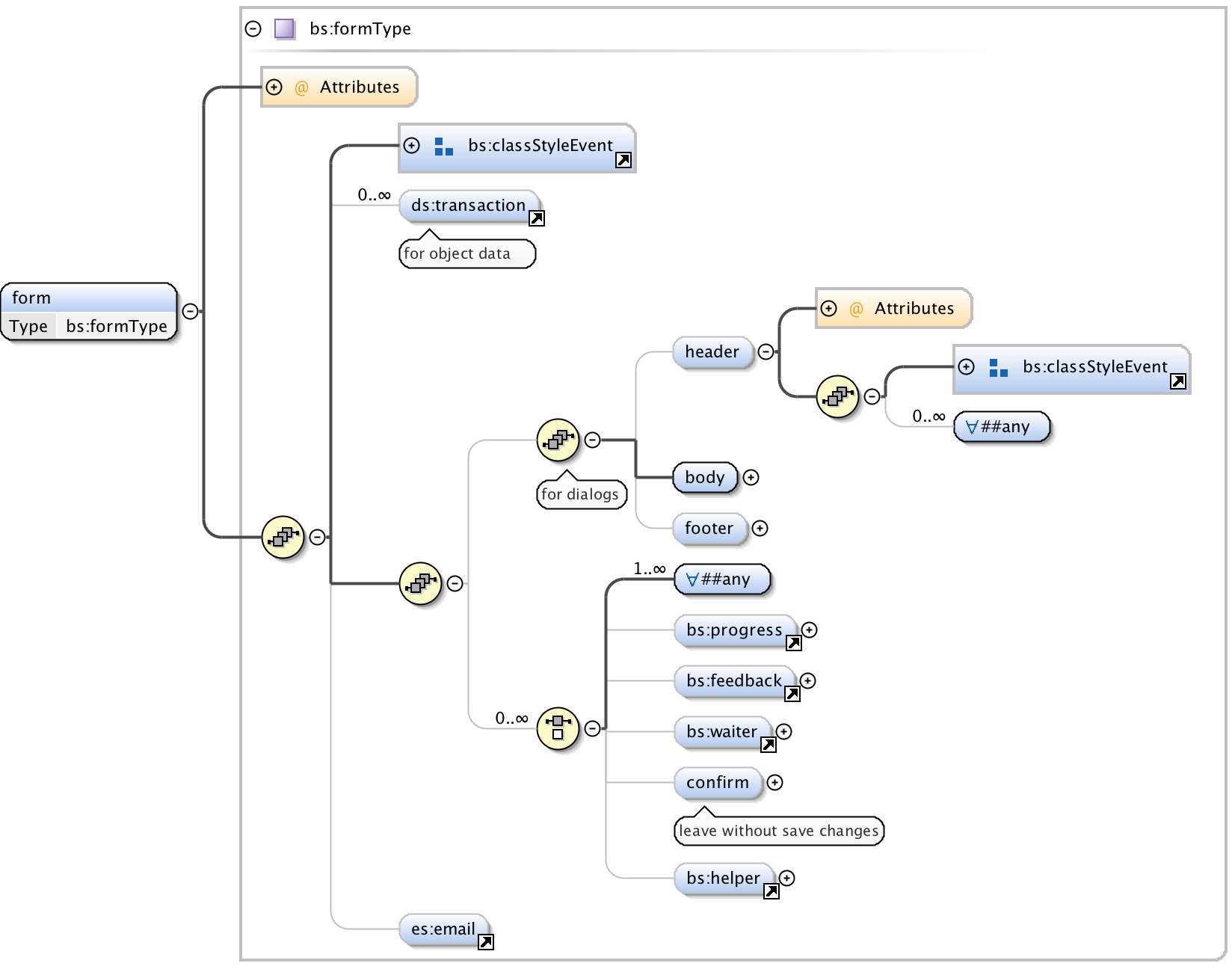
<bs:form/>
| Value | Description |
|---|---|
| form | Generic |
| database | Use with @data-format (*) |
| webservice | Connect to webservice from form with @data-format |
| Value | Description |
|---|---|
| db | Relational database |
| xmldb | XML file |
| jsondb | JSON file |
| Value | Description |
|---|---|
| flow | Form data |
| files | Binary files |
| xml | XML files |
| json | JSON files |
| Value | Description |
|---|---|
| login | Login form |
| signup | Sign up form |
| forgot | Forgot password form |
| user | User info form |
| activate | Active account form |
| Value | Description |
|---|---|
| javascript | Submit to javascript (*) |
| temp | Temporary data for form/dialog group |
| route | Javascript route by form |
| Value | Description |
|---|---|
| Send email from form | |
| paypal | Send PayPal from form |
@data-flow
Name of backend flow.
@data-target
Target for form response [@data-output] - IF not in form-container.
@data-root
XML root tag for the form data (server side) [xs:Name]. Defaults to root.
@data-no-root
Omit default XML root tag for the form data (server side) [true | false].
| Value | Description |
|---|---|
| HTML | HTML Submit |
| AJAX | AJAX Submit |
| QUERY | Submit as GET query |
| JS | For route |
| APP |
| Value | Description |
|---|---|
| SOAP | Simple Object Access Protocol by XML |
| GET | Select data |
| POST | Insert data |
| PUT | Full update |
| PATCH | Partial update |
| DELETE | Delete data |
@name
Form name as resolved as part of control names [xs:Name].
@omit-name (*)
Do not add name as part of name resolving [true | false]. Relevant if @name if used for reference. [NOT IMPLEMENTED YET]
@name-ns-prefix
List of ns prefixes together with @name-ns-uri's [space separated]
@name-ns-uri
Declare namespaces by list of namespace uri's together with name-ns-prefix [space separated]
@name-default-prefix
Add this prefix if names have no prefix (down the hierarchy).
@no-name-prefix
Add no prefix even no prefix is part of the names (down the hierarchy).
| Value | Description |
|---|---|
| xpath | root/name/@attribute |
| php | root[name][@attribute] (default) |
@name-resolving
Resolve name up the hierarchy [true | false] [NOT IMPLEMENTED YET]
@select
Name for @select for loading data into form [NOT IMPLEMENTED YET]
@column
Object column name [xs:Name]. Being used on top of @name when name resolving.
@return-state
&state when returning from server
@error-state
@state when returning from server with error
@autosubmit
autosubmit on form data change
@action
Submit to href [xs:anyURI]
@method
Form submit method [POST | GET]. Do not use.
@autocomplete
[on | off]
| Value | Description |
|---|---|
| load | On data load |
| enter | On control focus |
| click | On control click |
| input | On control input |
| leave | On control blur |
| submit | On submit |
| has | If has been validated then validate on input |
@validate-event
Do validation
@default-event
Add defaults
@format-event
Do formattings
@calc-event
Do calculations
@route-event
Do route (show/hide)
@inline
Form elements layout style [true | false]
| Value | Description |
|---|---|
| fixed | Always fixed |
| full | Always full |
| phone | |
| tablet | |
| laptop | |
| desktop | |
| cinema |
<bs:fieldset/>
@data-content
@data-format
<bs:form-grid/>
<bs:form-inline/>
<bs:input-group/>
<bs:control/>
<bs:submit/>
@data-content
@data-format
<bs:clear/>
@data-content
@data-format
<bs:reset/>
@data-content
@data-format
<bs:init/>
@data-content
@data-format
<bs:defaults/>
@data-content
@data-format
<bs:form-container/>
@data-content
@data-format
<bs:form-response/>
@data-content
@data-format
<bs:form-error/>
@data-content
@data-format
<bs:restart/>
<bs:feedback/>
@data-content
@data-format
<bs:helper/>
@data-content
@data-format
<bs:form-group/>
Is being used to make a collection of forms into a group of related form in the way that all form data will (only) be sent at the last form in the group
For the forms except the last one, the @data-content="temp".
<?xml version="1.0" encoding="UTF-8"?>
−
<bs:form-group xmlns:bs="http://www.bootstrap-cms.org" xmlns:bs-e="http://www.bootstrap-extensions.org" xmlns:ds="http://www.bootstrap-data.org" xmlns:sql="http://www.rapidweb.tools/sql">
−
<bs:form data-content="temp">
−
<bs:input>
<bs:label>Name</bs:label>
</bs:input>
[1 lines]
<bs:submit>Next</bs:submit>
</bs:form>
[3 lines]
−
<bs:form data-content="temp">
−
<bs:email>
<bs:label>Email</bs:label>
</bs:email>
[1 lines]
<bs:submit>Next</bs:submit>
</bs:form>
[3 lines]
−
<bs:form data-content="form">
−
<bs:tel>
<bs:label>Tel</bs:label>
</bs:tel>
[1 lines]
<bs:submit>Send</bs:submit>
</bs:form>
[3 lines]
</bs:form-group>
[12 lines]
Name Next Email Next Tel Send
Input Controls
With Data
| MarkUp | Description |
|---|---|
| @fixed | Control will get this value regardless of data. Works for both HTML and AJAX load. Not same as the @xs:fixed serving as validation markup. |
| bs:fixed | Same as @fixed but may have or other <bs:lang> sub elements. |
| @value | Control will get this value IF data has no value for the control - load default for both HTML and AJAX load. Overruled by @init or bs:init if any. |
| bs:value | Same as @value but may have <bs:lang> or other sub elements. |
| @empty | Control will get this value IF data is null (db) or absent (XML) - load default on null. |
| bs:empty | Same as @empty but may have <bs:lang> or other sub elements. |
| @name | Data is loaded from column with same name. Overruled by @select if any (serving as submit name only if present). |
| @table | Data is loaded from table with same name. |
| @select | Data is loaded from column with same name. |
| @select-table | Data is loaded from table with same name. |
| @default | Submit (or other event) default value |
| bs:default | Same as @default but may have <bs:lang> or other sub elements. |
| @default-event | The event to trigger default. |
| MarkUp | Description |
|---|---|
| @value | Value - if control is set by @checked or by data - for both load and submit. |
| @checked | Serves as load default. |
| @default | Serves as submit default if not checked. (To markup that value has not been set by the user). |
| @audodefault = false | The checkbox has no default value, i.e. no value is submitted if control is not checked. |
| MarkUp | Description |
|---|---|
| @value | Load default. |
| @default or first bs:option | Submit default. |
| @default-event | The event to trigger default. |
| @selected (on bs:option) | Load default. Overruled by @value if any. |
| bs:placeholder | Load default. Overruled by @value or @selected if any. |
Without Data
| MarkUp | Description |
|---|---|
| @value (or @fixed or @empty) | Control set to this value. |
| @checked or @selected | Control set to this value (if bs:select or bs:radio overruled by @value etc.). |
Load and Submit
| MarkUp | Description |
|---|---|
| @noload | Control has no data loaded. (Used when @name is needed for other purposes.) |
| @nosubmit | Control values will not be submittet. (Used when @name is needed for other purposes.) |
| @readonly | Control be edited. (Data will not be validated). |
| @disabled | Control cannot be edited and will not be submittet. (Data will not be validated). |
| @novalidation | Control value will not be validated. |
<bs:hidden/>
<bs:output/>
<bs:input/>
<bs:password/>
<bs:display/>
<bs:integer/>
<bs:decimal/>
<bs:float/>
Time & Date
Timezone adjustments
| @timezone | Description |
|---|---|
| server | [default] The timezone is set to the server timezone GMT |
| user | The timezone is set to the user setting implicit or explicit by the regional setting |
| local | The timezone is set by the browser setting |
| (+|-)(H)H(:mm) | Any valid timezone value, ex. +7 or +5:30 |
Localization
Set by the user regional setting - or @localize
| Value | Description |
|---|---|
| EU | dd-mm-yyyy |
| US | mm-dd-yyyy |
| ISO | yyyy-mm-dd |
<bs:date/>
<bs:time/>
<bs:datetime/>
<bs:day/>
<bs:month/>
<bs:year/>
<bs:day-month/>
<bs:year/>
<bs:week/>
<bs:duration/>
<bs:calendar/>
<bs:email/>
<bs:tel/>
<bs:url/>
<bs:textarea/>
<bs:select/>
Simple Select
Dropdowm Select
Multi Column Select
Open Select
Multiple Select
<bs:radio/>
Simple Radio
Open Radio
Hierarchical Radio
<bs:chooser/>
<bs:checkbox/>
<bs:toggle/>
<bs:checklist/>
<bs:checktree/>
<bs:listbox/>
<bs:multiple/>
<bs:matrix/>
@type
- radio
- checkbox
- select
- text
Radio Matrix
<?xml version="1.0" encoding="UTF-8"?>


<bs:matrix type="radio" xmlns:bs="http://www.bootstrap-cms.org" xmlns:bs-e="http://www.bootstrap-extensions.org" xmlns:ds="http://www.bootstrap-data.org" xmlns:sql="http://www.rapidweb.tools/sql"/>
Checkbox Matrix
<?xml version="1.0" encoding="UTF-8"?>


<bs:matrix type="checkbox" xmlns:bs="http://www.bootstrap-cms.org" xmlns:bs-e="http://www.bootstrap-extensions.org" xmlns:ds="http://www.bootstrap-data.org" xmlns:sql="http://www.rapidweb.tools/sql"/>
Select Matrix
<?xml version="1.0" encoding="UTF-8"?>


<bs:matrix type="select" xmlns:bs="http://www.bootstrap-cms.org" xmlns:bs-e="http://www.bootstrap-extensions.org" xmlns:ds="http://www.bootstrap-data.org" xmlns:sql="http://www.rapidweb.tools/sql"/>
Text Matrix
<?xml version="1.0" encoding="UTF-8"?>


<bs:matrix type="text" datatype="integer" xmlns:bs="http://www.bootstrap-cms.org" xmlns:bs-e="http://www.bootstrap-extensions.org" xmlns:ds="http://www.bootstrap-data.org" xmlns:sql="http://www.rapidweb.tools/sql"/>
<bs:file/>
<bs:range/>
<?xml version="1.0" encoding="UTF-8"?>

−
<bs:range type="single" min="0" max="100" step="1" value="50" xmlns:bs="http://www.bootstrap-cms.org" xmlns:bs-e="http://www.bootstrap-extensions.org" xmlns:ds="http://www.bootstrap-data.org" xmlns:sql="http://www.rapidweb.tools/sql">


<bs:label>Range</bs:label>


−
<bs:datalist>


<bs:option value="10"/>


<bs:option value="20"/>


<bs:option value="40"/>


</bs:datalist>


[3 lines]


</bs:range>


[5 lines]


Range
<?xml version="1.0" encoding="UTF-8"?>

−
<bs:range type="double" min="0" max="100" step="1" value="25-75" name="ranger" xmlns:bs="http://www.bootstrap-cms.org" xmlns:bs-e="http://www.bootstrap-extensions.org" xmlns:ds="http://www.bootstrap-data.org" xmlns:sql="http://www.rapidweb.tools/sql">


<bs:label>Double Range</bs:label>


<bs:output/>


</bs:range>


[2 lines]


Double Range
<?xml version="1.0" encoding="UTF-8"?>

−
<bs:range type="single" min="0" max="100" step="1" value="50" name="range" xmlns:bs="http://www.bootstrap-cms.org" xmlns:bs-e="http://www.bootstrap-extensions.org" xmlns:ds="http://www.bootstrap-data.org" xmlns:sql="http://www.rapidweb.tools/sql">


<bs:label>Range</bs:label>


<bs:output/>


−
<bs:datalist>


<bs:option value="10"/>


<bs:option value="20"/>


<bs:option value="40"/>


</bs:datalist>


[3 lines]


</bs:range>


[6 lines]


Range
<bs:search/>
<bs:barcode/>
<bs:accordion/>
<bs:alert/>
<bs:badge/>
<bs:card>
Card 1
1
1
<?xml version="1.0" encoding="UTF-8"?>
−
<bs:card xmlns:bs="http://www.bootstrap-cms.org" xmlns:bs-e="http://www.bootstrap-extensions.org" xmlns:ds="http://www.bootstrap-data.org" xmlns:sql="http://www.rapidweb.tools/sql">
−
<bs:header>
<bs:h1>Card 1</bs:h1>
</bs:header>
[1 lines]
−
<bs:body>
<bs:h3>1</bs:h3>
<bs:h3>1</bs:h3>
</bs:body>
[2 lines]
<bs:footer></bs:footer>
</bs:card>
[6 lines]
Card 1 1 1
<bs:card> w/ribbon
Front
−
<bs:card col="4" xmlns:bs="http://www.bootstrap-cms.org" xmlns:bs-e="http://www.bootstrap-extensions.org" xmlns:ds="http://www.bootstrap-data.org" xmlns:sql="http://www.rapidweb.tools/sql">
<!-- class="ribbon-box" -->
<bs:ribbon>New</bs:ribbon>
−
<bs:header>
<bs:h1>Front</bs:h1>
</bs:header>
[1 lines]
<bs:body>1</bs:body>
<bs:footer/>
</bs:card>
[5 lines]
New Front 1
<bs:card-grid>
Card 1
1
1
Card 2
2
2
−
<bs:card-grid class="vh-50" xmlns:bs="http://www.bootstrap-cms.org" xmlns:bs-e="http://www.bootstrap-extensions.org" xmlns:ds="http://www.bootstrap-data.org" xmlns:sql="http://www.rapidweb.tools/sql">
−
<bs:card>
−
<bs:header>
<bs:h1>Card 1</bs:h1>
</bs:header>
[1 lines]
−
<bs:body>
<bs:h3>1</bs:h3>
<bs:h3>1</bs:h3>
</bs:body>
[2 lines]
<bs:footer></bs:footer>
</bs:card>
[6 lines]
−
<bs:card>
−
<bs:header>
<bs:h1>Card 2</bs:h1>
</bs:header>
[1 lines]
−
<bs:body>
<bs:h3>2</bs:h3>
<bs:h3>2</bs:h3>
</bs:body>
[2 lines]
<bs:footer></bs:footer>
</bs:card>
[6 lines]
</bs:card-grid>
[14 lines]
Card 1 1 1 Card 2 2 2
<bs:card-group>
<bs:card-columns>
<bs:card-flip>
Front
1
1
Back
2
2
2
Front
1
Back
2
<?xml version="1.0" encoding="UTF-8"?>
−
<bs:card-grid class="vh-50" xmlns:bs="http://www.bootstrap-cms.org" xmlns:bs-e="http://www.bootstrap-extensions.org" xmlns:ds="http://www.bootstrap-data.org" xmlns:sql="http://www.rapidweb.tools/sql">
−
<bs:card-flip col="*">
−
<bs:front>
−
<bs:header>
<bs:h1>Front</bs:h1>
</bs:header>
[1 lines]
−
<bs:body>
<bs:h3>1</bs:h3>
<bs:h3>1</bs:h3>
</bs:body>
[2 lines]
<bs:footer/>
</bs:front>
[6 lines]
−
<bs:back>
−
<bs:header>
<bs:h1>Back</bs:h1>
</bs:header>
[1 lines]
−
<bs:body>
<bs:h3>2</bs:h3>
<bs:h3>2</bs:h3>
<bs:h3>2</bs:h3>
</bs:body>
[3 lines]
<bs:footer/>
</bs:back>
[7 lines]
</bs:card-flip>
[15 lines]
−
<bs:card-flip col="*">
−
<bs:front>
−
<bs:header>
<bs:h1>Front</bs:h1>
</bs:header>
[1 lines]
−
<bs:body>
<bs:h3>1</bs:h3>
</bs:body>
[1 lines]
<bs:footer/>
</bs:front>
[5 lines]
−
<bs:back>
−
<bs:header>
<bs:h1>Back</bs:h1>
</bs:header>
[1 lines]
−
<bs:body>
<bs:h3>2</bs:h3>
</bs:body>
[1 lines]
<bs:footer/>
</bs:back>
[5 lines]
</bs:card-flip>
[12 lines]
</bs:card-grid>
[29 lines]
Front 1 1 Back 2 2 2 Front 1 Back 2
<bs:carousel/>
<bs:collapse/>
<bs:jumbo/>
<bs:toast/>
<bs:table/>
<bs:tooltip/>
<bs:popover/>
Images
<bs:image-container/>
<bs:image-box/>
<bs:image/>
<bs:image-flip>


−
<bs:image-flip width="305px" height="205px" xmlns:bs="http://www.bootstrap-cms.org" xmlns:bs-e="http://www.bootstrap-extensions.org" xmlns:ds="http://www.bootstrap-data.org" xmlns:sql="http://www.rapidweb.tools/sql">


<bs:image src="cannabis-sky.jpg"/>


<bs:image src="cannabis-flower.jpg"/>


</bs:image-flip>


[2 lines]
<bs:image-slider>


−
<bs:image-slider width="305px" height="205px" xmlns:bs="http://www.bootstrap-cms.org" xmlns:bs-e="http://www.bootstrap-extensions.org" xmlns:ds="http://www.bootstrap-data.org" xmlns:sql="http://www.rapidweb.tools/sql">


<bs:image src="cannabis-sky.jpg"/>


<bs:image src="cannabis-flower.jpg"/>


<!--<bs:handle></bs:handle>-->


</bs:image-slider>


[2 lines]
<bs:image-overlay>
Flip


−
<bs:image-overlay width="305px" height="205px" type="up" xmlns:bs="http://www.bootstrap-cms.org" xmlns:bs-e="http://www.bootstrap-extensions.org" xmlns:ds="http://www.bootstrap-data.org" xmlns:sql="http://www.rapidweb.tools/sql">


<bs:image src="cannabis-sky.jpg"/>


<bs:image src="cannabis-flower.jpg"/>


</bs:image-overlay>


[2 lines]
Text

−
<bs:image-overlay width="305px" height="205px" xmlns:bs="http://www.bootstrap-cms.org" xmlns:bs-e="http://www.bootstrap-extensions.org" xmlns:ds="http://www.bootstrap-data.org" xmlns:sql="http://www.rapidweb.tools/sql">


<bs:image src="cannabis-sky.jpg"/>


<bs:div class="fs-1 text-white">Hello</bs:div>


</bs:image-overlay>


[2 lines]


Hello
<bs:pan-zoom/>
<bs:svg/>
<bs:object/>
<bs:canvas/>
<bs:map/>
<bs:bg-image/>
<bs:parallax>
<?xml version="1.0" encoding="UTF-8"?>


<bs:parallax src="/images/parallax.jpg" speed="10" xmlns:bs="http://www.bootstrap-cms.org" xmlns:bs-e="http://www.bootstrap-extensions.org" xmlns:ds="http://www.bootstrap-data.org" xmlns:sql="http://www.rapidweb.tools/sql"/>
<bs:figure/>
<bs:named-source/>
<bs:pdf-viewer/>
<bs:barcode-scanner/>
<bs:image-editor/>
Audio & Video
<bs:audio-box/>
<bs:audio/>
<?xml version="1.0" encoding="UTF-8"?>


<bs:audio src="LastChristmas.mp3" controls="true" xmlns:bs="http://www.bootstrap-cms.org" xmlns:bs-e="http://www.bootstrap-extensions.org" xmlns:ds="http://www.bootstrap-data.org" xmlns:sql="http://www.rapidweb.tools/sql"/>
<bs:speakers/>
<?xml version="1.0" encoding="UTF-8"?>

−
<bs:speakers xmlns:bs="http://www.bootstrap-cms.org" xmlns:bs-e="http://www.bootstrap-extensions.org" xmlns:ds="http://www.bootstrap-data.org" xmlns:sql="http://www.rapidweb.tools/sql">

−
<bs:equalizer height="20" color="black">

<bs:bar width="5"/>


</bs:equalizer>


[1 lines]


</bs:speakers>


[2 lines]
<bs:backgrund-audio/>
<bs:video-box/>
<bs:video/>
Basic Video
<?xml version="1.0" encoding="UTF-8"?>

−
<bs:video-box xmlns:bs="http://www.bootstrap-cms.org" xmlns:bs-e="http://www.bootstrap-extensions.org" xmlns:ds="http://www.bootstrap-data.org" xmlns:sql="http://www.rapidweb.tools/sql">

−
<bs:video src="short.mp4" controls="true" width="720" height="306">

<bs:remote class="d-flex">Playback</bs:remote>


</bs:video>


[1 lines]


</bs:video-box>


[2 lines]


Playback
<bs:youtube/>
Simple
<?xml version="1.0" encoding="UTF-8"?>


<bs:youtube YouTubeID="yUWvKDf3g5Y" width="640" height="480" xmlns:bs="http://www.bootstrap-cms.org" xmlns:bs-e="http://www.bootstrap-extensions.org" xmlns:ds="http://www.bootstrap-data.org" xmlns:sql="http://www.rapidweb.tools/sql"/>
Picture in picture
<?xml version="1.0" encoding="UTF-8"?>

−
<bs:youtube YouTubeID="nQDjSGnmYBI" xmlns:bs="http://www.bootstrap-cms.org" xmlns:bs-e="http://www.bootstrap-extensions.org" xmlns:ds="http://www.bootstrap-data.org" xmlns:sql="http://www.rapidweb.tools/sql">

<bs:pictureInPicture width="640" height="480"/>


</bs:youtube>


[1 lines]
<bs:background-video/>
<RTC/>
Real Time Communication
Audio/Video Chat
<bs:code/>
<bs:value-of/>
<bs:speak/>
Text to Speak
<bs:recognition/>
Speech Recognition
<bs:pdf/>
HTML to PDF (JS)
<bs:google-maps/>
Google Maps
<bs:progress/>
Sticky Elements
Scroll Effects
@scroll
<bs:scroll>
HTML5 Validation
| Attribute | Description |
|---|---|
| @required | Mandatory |
| @pattern | Regular Expression |
| @maxLength | Max Length (blocking) |
| @minLength | Min Length |
| @min | Min Value |
| @max | Max Value |
| @step | Value Steps |
Datatype Validation
| Attribute | Description |
|---|---|
| integer | |
| decimal | |
| tel | |
| url | |
| date | |
| time | |
| datetime | |
| week | |
| day | |
| month | |
| year |
XML Schema SimpleType Validation
| Attribute | Description |
|---|---|
| xs:string | |
| xs:decimal | |
| xs:integer | |
| xs:date | |
| xs:time | |
| xs:datetime |
| Attribute | Description |
|---|---|
| xs:minExclusive | Any value greater than this |
| xs:maxExclusive | Any value less than this |
| xs:minInclusive | Any value greater or equal to this |
| xs:maxInclusive | Any value less or equal to this |
| xs:totalDigits | Max total digits including both integer and decimal parts |
| xs:fractionDigits | Max decimal fraction digits |
| xs:length | Fixed length |
| xs:minLength | Min length |
| xs:maxLength | Max length |
| xs:fixed | Must match this value |
| xs:minOccurs | Min instances |
| xs:maxOccurs | Max instances |
| Attribute | Description |
|---|---|
| xs:whiteSpace | Remove whitespaces [preserve | replace | collapse] |
| xs:default | Insert if value is empty |
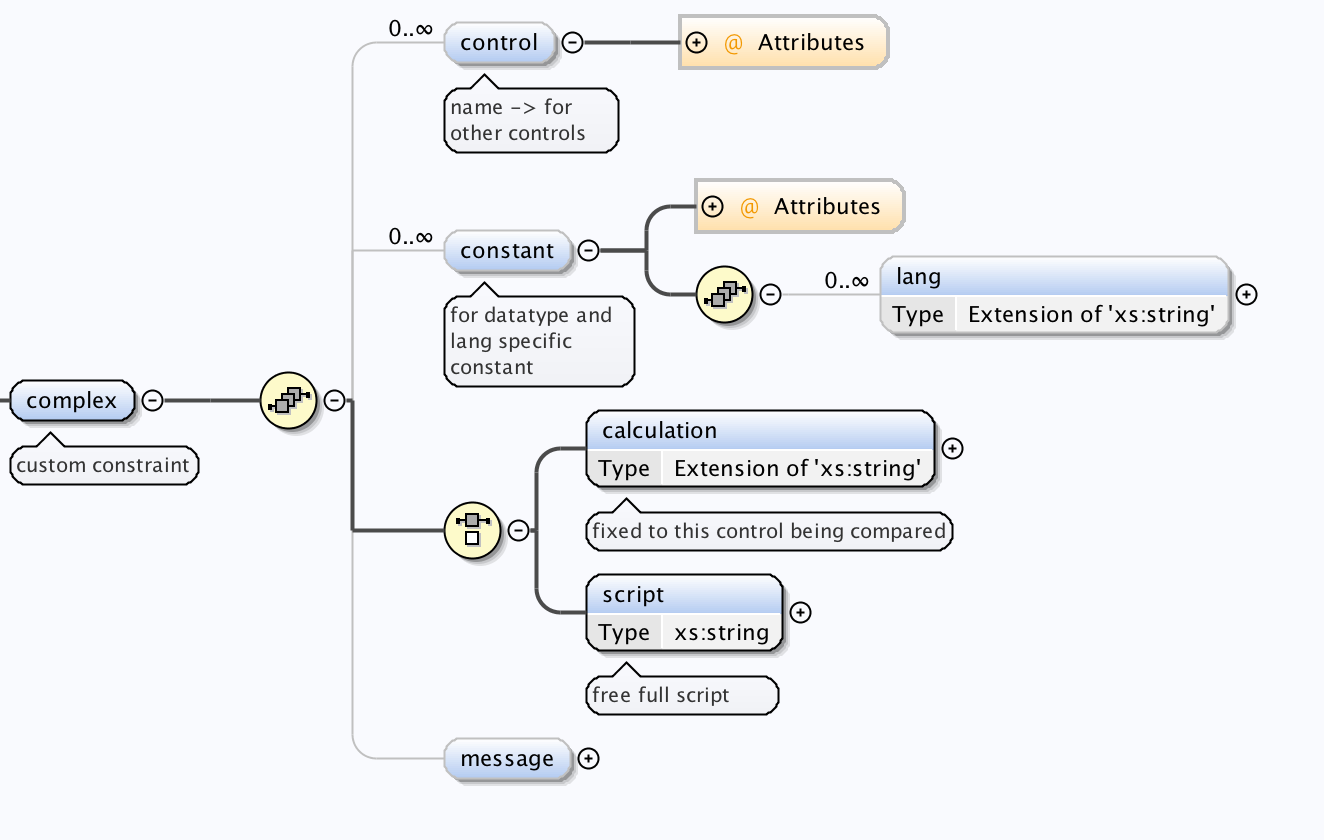
Cross Field Validation
Multiple field based validation
@toggle
@toggle defines the Javascript action (function). Becomes @data-{prefix}-toggle.
ID System
@id
| Prefix | XML | HTML | Description |
|---|---|---|---|
| no prefix | {ID} | {prefix}{ID} | Adding prefix |
| + | +{ID} | {ID} | preserve |
@name
Is only used on input controls.
No prefixing
@itemname
Becomes @data-itemname in HTML
@target, @selector, @scope
@target is used for pointing to the result item of action defined in @toggle (@data-toggle or @data-bs-toggle etc.).
input@target is pointing at another input by @name (if without a prefix).
@selector is used for pointing for the activating item.
@scope is used for setting the scope of the id in @target or @selector.
<bs:scope> is tag based scoping defining the scope without setting a @scope attribute.
| Prefix | XML | HTML | Description |
|---|---|---|---|
| {no prefix} | html tag name (or input@name) | html tag name (or input@name) | css class |
| . | .{class} | .{class} | css class |
| # | {ID} | #{prefix}{ID} | Referring to the @id (ID) |
| + | +{ID} | {ID} | Preserving ID |
| :: | ::{tagname} | {ID} | translate tag to ID |
| @ | @itemname={name} | @data-itemname={name}, @data-target=@{name} | Adressing by itemname |
| % | %{itemname} targetting @itemname | @id={localID}, @data-target=#{localID} | Translating @itemname into @id="{localID}" |
Becomes @data-target, @data-scope, @data-selector
@tabname & @tabref
Used for targetting tabs and dialogs
The target tab item is having a @tabname={tabname}, and the referring tab item (without tab pane) is having a @tabref={tabname} adding @data-bs-target=#{ID}
Works same as @itemname and @target="%{itemname}"
@parent
@parent is used for scoping the action. @parent becomes @data-parent (or @data-bs-parent)
ID segments
| Segment | Content | Example | Description |
|---|---|---|---|
| Prefix | {prefix} | D25 | Prefixing |
| ID | {ID} | D251234 | The basic ID |
| Input-group segment | _{counter} | D251234_3 | Used for numbering the segments of the input-group |
| Proxy | _X | D251234_X | Used for the proxy of the input or input-group |
| Row | X{row} | D251234X4 | Row in table |
| Multiple | T{instance} | D251234T4 | Is used for numbering elements of a multiple control |
| Master | _M | D251234_M | Is used for master part of master-details navigation |
| Details | _D | D251234_D | Is used for details part of master-details navigation |
| Container | _O | D251234_O | Is used for outer element in bs:input etc. |
@template="{name}" & <bs:template name="{name}">
@template="{name}" is used to refer to html <template name="{name}"> (for js)
Custom Javascript
Use can easily add conditional custom Javascript.
Simple Routing
Complex Routing
Simple Calculation
Complex Calculation
Number Formatting
| Attribute | Datatype | Default | Description |
|---|---|---|---|
| @decimals | integer | Fixed decimals length | |
| @thousand | boolean | false | Thousand grouping [boolean] [false |
| @autocorrect | boolean | false | Parse Float |
Regional Formatting
| Decimal | Description |
|---|---|
| dot | Dot as decimal point and comma as thousand separator. |
| comma | Comma as decimal point and dot as thousand separator. |
Date & Time Formatting
@timezone
| Timezone | Description |
|---|---|
| none | no timezone |
| server | GMT |
| region | region setting chosen by the user |
| user | set by query ¶meter and saved by cookie and session |
| local | The local timezone |
| (+|-)HH:mm | Timezone as specified |
Regional Formatting
| Region | Description |
|---|---|
| ISO | YYYY-MM-DD HH:mm:ss |
| EU | DD-MM-YYYY HH:mm:ss |
| US | MM-DD-YYYY hh:mm:ss (am|pm) |
Text Formatting
| Attribute | Description |
|---|---|
| @case | [uppercase | lowercase | camelcase] |
| @whitespace | [preserve | trim | normalize] |
| @trim | characters for start and end trim |
| @formatting |
<bs:formatting>
Styling
Bootstrap 5
@class
You can add any and all classes you like both Bootstrap classes or your own classes.
<?xml version="1.0" encoding="UTF-8"?>

−
<bs:document xmlns:bs="http://www.bootstrap-cms.org" xmlns:bs-e="http://www.bootstrap-extensions.org" xmlns:ds="http://www.bootstrap-data.org" xmlns:sql="http://www.rapidweb.tools/sql">

−
<bs:head>

<bs:style src="123.com"/>


</bs:head>


[1 lines]


</bs:document>


[2 lines]
<?xml version="1.0" encoding="UTF-8"?>

−
<bs:carousel class="m-3" xmlns:bs="http://www.bootstrap-cms.org" xmlns:bs-e="http://www.bootstrap-extensions.org" xmlns:ds="http://www.bootstrap-data.org" xmlns:sql="http://www.rapidweb.tools/sql">

<bs:seat/>


</bs:carousel>


[1 lines]
@style
You can add any and all inline styles you like. The system takes care of CSP for you.
<?xml version="1.0" encoding="UTF-8"?>

−
<bs:carousel style="background-color:green;" xmlns:bs="http://www.bootstrap-cms.org" xmlns:bs-e="http://www.bootstrap-extensions.org" xmlns:ds="http://www.bootstrap-data.org" xmlns:sql="http://www.rapidweb.tools/sql">

<bs:seat/>


</bs:carousel>


[1 lines]
Classes
Semantic Styles
Colors
Color Palette
| primary | success | info | warning | danger | secondary | dark | light | white | transparent |
|---|
| blue | indigo | purple | pink | red | orange | yellow | green | cyan | teal | gray | |
|---|---|---|---|---|---|---|---|---|---|---|---|
| blue | indigo | purple | pink | red | orange | yellow | green | cyan | teal | gray | |
| 100 | |||||||||||
| 200 | |||||||||||
| 300 | |||||||||||
| 400 | |||||||||||
| 500 | |||||||||||
| 600 | |||||||||||
| 700 | |||||||||||
| 800 | |||||||||||
| 900 |
@color
Color Theme
@bg-color
Background Color
@text-color
Text Color
@outline
Outline Color
@color-hover
Color on Mouse over
@color-active
Color when Active
@color-focus
Color when Focus
@color-disabled
Color when Disabled
@bg-opacity
Background Color Opacity [0;1] #.#
@text-opacity
Text Color Opacity [0;1] #.#
Text
Borders
Spacing
Alignment
Grid
Shadow
Position
Overflow
Float
Height & Width
Size
Display
Responsive & Conditional
Use can easily add both responsive and conditional classes and styling.
Responsive
Use can easily add both responsive and conditional styling.
Responsive
Use can easily add both responsive and conditional classes.
Responsive
Use can easily add both responsive and conditional Animations.
Responsive
Use can easily add both responsive styling.
Default Styling
Bootstrap User Guide
The components are having the default styling from the Bootstrap user guide.
However, it it easily overwritten.
Role and Profile
@role
Will be show on this (or list of) role(s) only.
@profile
Will be show on this (or list of) profile(s) only.
<?xml version="1.0" encoding="UTF-8"?>

−
<bs:carousel role="1 2 9" profile="3 6" xmlns:bs="http://www.bootstrap-cms.org" xmlns:bs-e="http://www.bootstrap-extensions.org" xmlns:ds="http://www.bootstrap-data.org" xmlns:sql="http://www.rapidweb.tools/sql">

<bs:seat/>


</bs:carousel>


[1 lines]
State and Task
@state
Show on this (or list of) state(s).
May be set as query parameter &state=1, but will not get preserved as query parameter on page navigation.
@task
Show on this (or list of) task(s).
May be set as a query parameter &task=2, and will be preserved as query parameter on page navigation.
<?xml version="1.0" encoding="UTF-8"?>

−
<bs:carousel state="2" tast="1" xmlns:bs="http://www.bootstrap-cms.org" xmlns:bs-e="http://www.bootstrap-extensions.org" xmlns:ds="http://www.bootstrap-data.org" xmlns:sql="http://www.rapidweb.tools/sql">

<bs:seat/>


</bs:carousel>


[1 lines]
Language & Region
@lang
Shown on this language code only.
@region
Shown on this region code only
<?xml version="1.0" encoding="UTF-8"?>

−
<bs:carousel lang="da" region="DK" xmlns:bs="http://www.bootstrap-cms.org" xmlns:bs-e="http://www.bootstrap-extensions.org" xmlns:ds="http://www.bootstrap-data.org" xmlns:sql="http://www.rapidweb.tools/sql">

<bs:seat/>


</bs:carousel>


[1 lines]
Data Access
@access
Show/hide/enable/disable the control based on the database privilege to the row
| Value | Description |
|---|---|
| 0 | hidden if privilege is 0 |
| 1 or 2 or 3 | shown as readonly if privilege is same or higher. |
| 4 or 5 | shown and enabled if privilege is 4 (or higher) or 5 |
<?xml version="1.0" encoding="UTF-8"?>

−
<bs:carousel access="1" xmlns:bs="http://www.bootstrap-cms.org" xmlns:bs-e="http://www.bootstrap-extensions.org" xmlns:ds="http://www.bootstrap-data.org" xmlns:sql="http://www.rapidweb.tools/sql">

<bs:seat/>


</bs:carousel>


[1 lines]
Version
@version
Version number (or list of version numbers) for showing the content.
<?xml version="1.0" encoding="UTF-8"?>

−
<bs:carousel version="2" xmlns:bs="http://www.bootstrap-cms.org" xmlns:bs-e="http://www.bootstrap-extensions.org" xmlns:ds="http://www.bootstrap-data.org" xmlns:sql="http://www.rapidweb.tools/sql">

<bs:seat/>


</bs:carousel>


[1 lines]
Publishing
@publish
DateTime for showing the content.
@deadline
Will be readOnly if dateTime for has been exceeded.
@expiry
DateTime for removing the content.
<?xml version="1.0" encoding="UTF-8"?>

−
<bs:carousel publish="2024-04-01" expiry="2024-05-01" xmlns:bs="http://www.bootstrap-cms.org" xmlns:bs-e="http://www.bootstrap-extensions.org" xmlns:ds="http://www.bootstrap-data.org" xmlns:sql="http://www.rapidweb.tools/sql">

<bs:seat/>


</bs:carousel>


[1 lines]
Performance
@p
Set as query parameter &p=2
| Value | Description |
|---|---|
| 0 | Show load time |
| 1 | JS debugging to browser console |
| 2 | Dump temp files |
| 3 | PHP debugging |
<?xml version="1.0" encoding="UTF-8"?>

−
<bs:carousel p="2" xmlns:bs="http://www.bootstrap-cms.org" xmlns:bs-e="http://www.bootstrap-extensions.org" xmlns:ds="http://www.bootstrap-data.org" xmlns:sql="http://www.rapidweb.tools/sql">

<bs:seat/>


</bs:carousel>


[1 lines]
Privacy
@privacy
Will be shown only if has this (or list of) privacy (gdpr or others) and it is still valid.
Condition
@condition
Editing
@editor
If @editor="true", then only visible in editor mode (query parameter &editor=true)
@editable
If @editable="true", then the element - and any descendant of the element - will be editable.
@contenteditable
If @contenteditable="true", then the text on this element will be editable
@noedit
If @noedit="true", then the element - and any descendant of the element - will NOT be editable even if an ancestor is set to @editable="true".
<?xml version="1.0" encoding="UTF-8"?>

−
<bs:carousel editor="true" editable="true" xmlns:bs="http://www.bootstrap-cms.org" xmlns:bs-e="http://www.bootstrap-extensions.org" xmlns:ds="http://www.bootstrap-data.org" xmlns:sql="http://www.rapidweb.tools/sql">

<bs:seat/>


</bs:carousel>


[1 lines]
<?xml version="1.0" encoding="UTF-8"?>


<bs:h1 contenteditable="true" xmlns:bs="http://www.bootstrap-cms.org" xmlns:bs-e="http://www.bootstrap-extensions.org" xmlns:ds="http://www.bootstrap-data.org" xmlns:sql="http://www.rapidweb.tools/sql">Hello</bs:h1>


Hello
Conditional Attributes
Use can easily add consitional Attributes.
The system has a comprehensive list of defining regions and languages with an expensive list of properties attached to it:
| Value | Description |
|---|---|
| @decimal | Decimal separator [dot | comma] |
| @thousand | Thousand group separator [dot | comma | space | aprostrophe] |
| @datetime | Datetime format [US | EU | RAW] |
| @timezone | Timezone (+)HH:mm |
| @timezoneCity | The city defining the timezone. |
| @calendar | Calendar system [christian | buddhist | muslim] |
| @firstdayofweek | First day of week [monday | sunday] |
The settings may be included in the _directory.xml file, in a separate settings.xml file under /setup directory or may rely on system builtin settings.
<bs:lang>
Only shown in this language.
@code
Language code.
@default
Is default language [true].
<?xml version="1.0" encoding="UTF-8"?>
−
<bs:lang code="en" xmlns:bs="http://www.bootstrap-cms.org" xmlns:bs-e="http://www.bootstrap-extensions.org" xmlns:ds="http://www.bootstrap-data.org" xmlns:sql="http://www.rapidweb.tools/sql">
<bs:h1>Hello</bs:h1>
<bs:p>there...</bs:p>
</bs:lang>
[2 lines]
Hello there...
<bs:lang-group>
<bs:region>
Only shown in this region.
@code
Region (country) code.
@default
Is default region [true].
<?xml version="1.0" encoding="UTF-8"?>
−
<bs:region code="UK" xmlns:bs="http://www.bootstrap-cms.org" xmlns:bs-e="http://www.bootstrap-extensions.org" xmlns:ds="http://www.bootstrap-data.org" xmlns:sql="http://www.rapidweb.tools/sql">
<bs:h1>Hello</bs:h1>
<bs:p>there...</bs:p>
</bs:region>
[2 lines]
Hello there...
<bs:region-group>
Localization
The location system consist of 3 parts
- The settings.xml file defining the regions and languages
- The input controls displaying data in line of regional settings.
- The <bs:text> element taking care of regional settings.
<bs:text>
@datetype
If the @datatype attributes is set, then numeric and datetime displays will be adjusted to regional settings.
Standard Text
The system has a number of builtin but configuarable standard text labels for forms, tables, etc.
Standard Messages
The system has a number builtin but configuarable standard server messages.
<bs:component>
Components are at root tag in include files.
@ref
Is used to reference <bs:component name="{name}"> by name.
<bs:collection>
Collections are used to include collection of components referenced by name (@ref)
<bs:collection> might be located in the main document or in an <bs:include>
<bs:include>
For including external files.
@src
File path
@location
- system
- siteroot
- pageroot
- page
- local
@component
Name of component to show
@select
Xpath
@error
- ignore
- warning
- fatal
@type
- inline (xml)
- outline (xslt)
@preprocess
Filepath to xslt for preprocessing
@namespace
Namespace for the include being preprocessed
@encode
- base64
Database
Frontend
The frontend component of the database system consists of it's own namespace for marking up the frontend features of the databasesystem. In short, it consists of the following tags:
- ds:data
- ds:master
- ds:details
- ds:search
- ds:lookup
For tables, it has the following key features:
- ds:search
- ds:sort
Backend
The backend part of the system is almost entirely automatically enabled. The way to configure the system is by marking up in the frontend.
Relational Data
The relational data part of the system consists of a dedicated and separate markup syntax for defining data tables and views. It basically has two level:
- A simple markup for doing the basic stuff.
- SQML - a full XML markup of SQL.
XML & JSON
Database Frontend
Data Table
| Id | Name | |
|---|---|---|
| 123 | Peter Hansen | peter@hansen.com |
@name
<?xml version="1.0" encoding="UTF-8"?>
−
<bs:table name="user" xmlns:bs="http://www.bootstrap-cms.org" xmlns:bs-e="http://www.bootstrap-extensions.org" xmlns:ds="http://www.bootstrap-data.org" xmlns:sql="http://www.rapidweb.tools/sql">
−
<bs:head>
−
<bs:row>
<bs:cell>Id</bs:cell>
<bs:cell>Name</bs:cell>
<bs:cell>Email</bs:cell>
</bs:row>
[3 lines]
</bs:head>
[4 lines]
−
<bs:body>
−
<bs:row>
<bs:cell>Id</bs:cell>
<bs:cell>Name</bs:cell>
<bs:cell>Email</bs:cell>
</bs:row>
[3 lines]
</bs:body>
[4 lines]
</bs:table>
[10 lines]
Id Name Email Id Name Email
<ds:part>
<?xml version="1.0" encoding="UTF-8"?>
−
<bs:table name="user" xmlns:bs="http://www.bootstrap-cms.org" xmlns:bs-e="http://www.bootstrap-extensions.org" xmlns:ds="http://www.bootstrap-data.org" xmlns:sql="http://www.rapidweb.tools/sql">
−
<bs:head>
−
<bs:row>
<bs:cell>Id</bs:cell>
<bs:cell>Name</bs:cell>
<bs:cell>Email</bs:cell>
</bs:row>
[3 lines]
</bs:head>
[4 lines]
−
<ds:part>
−
<ds:row>
<bs:column name="@id"/>
<bs:column name="name"/>
<bs:column name="email"/>
</ds:row>
[3 lines]
</ds:part>
[4 lines]
</bs:table>
[10 lines]
Id Name Email
Data Cards
Data Accordion
Data Carousel
bs:code
Data object.
bs:image
Data object.
Master Data
Data Details
Data Search
Data History
Data Versioning
Row Privilege
Data Navigation Layout
Details Next Screen
Details Next Tab
Outline Details
Inline Details
Details Dialog
Filter & Sort
Details Button
New Row Button
- Insert at end of table
- Insert Before or After this row
Delete Button
Duplicate Button
LookUp Button
Populate and/or select Select Control option
Populate and/or select Radio option
Populate and/or select Menu item
Value-of @select
Data Storage
- Relational Data
- XML
- JSON
Relational Database
It is optional to install/use a relational database (mySQL or MariaDB).
If you choose to setup a RDBMS then it will include a standard system part and a custom part. The system tables are needed for sign in, privilege management and more.
XML
It is possible to run the sign in and privilege system entirely based on XML files.
However, XML files are also useful for business data optionaly in combination with an RDBMS.
JSON
Sign In
Sign Up
To sign up the users, you will need to make a HTML form like this:
<?xml version="1.0" encoding="UTF-8"?>
−
<bs:form validate="submit" data-content="signup" xmlns:xsi="http://www.w3.org/2001/XMLSchema-instance" xmlns:bs="http://www.bootstrap-cms.org" xmlns:bs-e="http://www.bootstrap-extensions.org" xmlns:ds="http://www.bootstrap-data.org" xmlns:sql="http://www.rapidweb.tools/sql">
−
<bs:input required="true" name="name">
−
<bs:label>
<bs:icon name="person" margin-right="1"/>
Name
</bs:label>
[1 lines]
<bs:invalid-text asTooltip="true">Please enter your name</bs:invalid-text>
</bs:input>
[3 lines]
−
<bs:input type="email" name="email" required="true">
−
<bs:label>
<bs:icon name="envelope" margin-right="1"/>
Email
</bs:label>
[1 lines]
<bs:invalid-text asTooltip="true">Please enter your email</bs:invalid-text>
</bs:input>
[3 lines]
−
<bs:input type="password" name="password" required="true">
−
<bs:label>
<bs:icon name="key" margin-right="1"/>
Password
</bs:label>
[1 lines]
<bs:invalid-text asTooltip="true">Please enter your password</bs:invalid-text>
</bs:input>
[3 lines]
−
<bs:input type="password" required="true">
−
<bs:label>
<bs:icon name="key" margin-right="1"/>
Retype Password
</bs:label>
[1 lines]
<bs:invalid-text asTooltip="true">Please retype your password</bs:invalid-text>
</bs:input>
[3 lines]
−
<bs:button type="submit" color="success">
<bs:icon name="translate" margin-right="1"/>
Sign Up
</bs:button>
[1 lines]
−
<bs:close>
<bs:icon name="x" margin-right="1"/>
Close
</bs:close>
[1 lines]
</bs:form>
[20 lines]
Please enter your name Please enter your email Please enter your password Please retype your password
Log In
To log in the users, you will need to make an HTML form like this:
<?xml version="1.0" encoding="UTF-8"?>
−
<bs:form validate="submit" data-content="login" xmlns:xsi="http://www.w3.org/2001/XMLSchema-instance" xmlns:bs="http://www.bootstrap-cms.org" xmlns:bs-e="http://www.bootstrap-extensions.org" xmlns:ds="http://www.bootstrap-data.org" xmlns:sql="http://www.rapidweb.tools/sql">
−
<bs:input type="email" name="email" required="true" addon="true" autofocus="true">
−
<bs:placeholder>
<bs:lang code="en">your email</bs:lang>
<bs:lang code="da">din email</bs:lang>
</bs:placeholder>
[2 lines]
−
<bs:label>
<!--<bs:icon name="envelope" margin-right="1"/>-->
<bs:lang code="en">Email</bs:lang>
<bs:lang code="da">Email</bs:lang>
</bs:label>
[2 lines]
−
<bs:invalid-text asTooltip="true">
<bs:lang code="en">Please enter your email</bs:lang>
<bs:lang code="da">Skriv email</bs:lang>
</bs:invalid-text>
[2 lines]
</bs:input>
[9 lines]
−
<bs:input type="password" name="password" required="true" addon="true">
−
<bs:placeholder>
<bs:lang code="en">your password</bs:lang>
<bs:lang code="da">din adgangskode</bs:lang>
</bs:placeholder>
[2 lines]
−
<bs:label>
<!--<bs:icon name="key" margin-right="1"/>-->
<bs:lang code="en">Password</bs:lang>
<bs:lang code="da">Adgangskode</bs:lang>
</bs:label>
[2 lines]
−
<bs:invalid-text asTooltip="true">
<bs:lang code="en">Please enter your password</bs:lang>
<bs:lang code="da">Skriv din adgangskode</bs:lang>
</bs:invalid-text>
[2 lines]
</bs:input>
[9 lines]
−
<bs:button type="submit" color="success">
<bs:icon name="box-arrow-in-right" margin-right="1"/>
<bs:lang code="en">Log In</bs:lang>
<bs:lang code="da">Log På</bs:lang>
</bs:button>
[3 lines]
</bs:form>
[24 lines]
your email din email Email Email Please enter your email Skriv email your password din adgangskode Password Adgangskode Please enter your password Skriv din adgangskode Log In Log På
Forgot Password
To create a "forgot password" dialog, you will need to make an HTML form like this:
<?xml version="1.0" encoding="UTF-8"?>
−
<bs:form data-content="forgot" xmlns:xsi="http://www.w3.org/2001/XMLSchema-instance" xmlns:bs="http://www.bootstrap-cms.org" xmlns:bs-e="http://www.bootstrap-extensions.org" xmlns:ds="http://www.bootstrap-data.org" xmlns:sql="http://www.rapidweb.tools/sql">
−
<bs:input type="email" name="email" required="true" addon="true" autofocus="true">
−
<bs:placeholder>
<bs:lang code="en">your email</bs:lang>
<bs:lang code="da">din email</bs:lang>
</bs:placeholder>
[2 lines]
−
<bs:label>
<!--<bs:icon name="envelope" type="bs" margin-right="1"/>-->
<bs:lang code="en">Email</bs:lang>
<bs:lang code="da">Email</bs:lang>
</bs:label>
[2 lines]
−
<bs:invalid-text asTooltip="true">
<bs:lang code="en">Please enter your email</bs:lang>
<bs:lang code="da">Skriv din email</bs:lang>
</bs:invalid-text>
[2 lines]
</bs:input>
[9 lines]
−
<bs:input type="text" name="key" addon="true">
−
<bs:placeholder>
<bs:lang code="en">key code (check your mailbox)</bs:lang>
<bs:lang code="da">kode (check din mailbox)</bs:lang>
</bs:placeholder>
[2 lines]
−
<bs:label>
<!--<bs:icon name="key" type="bs" margin-right="1"/>-->
<bs:lang code="en">Code (from email when received)</bs:lang>
<bs:lang code="da">Kode (fra email når du har modtaget den)</bs:lang>
</bs:label>
[2 lines]
</bs:input>
[6 lines]
−
<bs:button type="submit" color="success">
<!--<bs:icon name="box-arrow-in-right" margin-right="1"/>-->
<bs:lang code="en">Send</bs:lang>
<bs:lang code="da">Send</bs:lang>
</bs:button>
[2 lines]
−
<bs:close margin-left="1">
<bs:lang code="en">Close</bs:lang>
<bs:lang code="da">Luk</bs:lang>
</bs:close>
[2 lines]
</bs:form>
[23 lines]
your email din email Email Email Please enter your email Skriv din email key code (check your mailbox) kode (check din mailbox) Code (from email when received) Kode (fra email når du har modtaget den) Send Send Close Luk
Activate Account
To activate the user accounts, you will need to make an HTML form like this:
<?xml version="1.0" encoding="UTF-8"?>
−
<bs:form data-content="activate" xmlns:xsi="http://www.w3.org/2001/XMLSchema-instance" xmlns:bs="http://www.bootstrap-cms.org" xmlns:bs-e="http://www.bootstrap-extensions.org" xmlns:ds="http://www.bootstrap-data.org" xmlns:sql="http://www.rapidweb.tools/sql">
−
<bs:input type="email" name="email" required="true" autofocus="true">
−
<bs:placeholder>
<bs:lang code="en">email</bs:lang>
<bs:lang code="da">email</bs:lang>
</bs:placeholder>
[2 lines]
−
<bs:label>
<!--<bs:icon name="envelope" type="bs" margin-right="1"/>-->
<bs:lang code="en">Email</bs:lang>
<bs:lang code="da">Email</bs:lang>
</bs:label>
[2 lines]
−
<bs:invalid-text asTooltip="true">
<bs:lang code="en">Please enter your email</bs:lang>
<bs:lang code="da">Skriv din email</bs:lang>
</bs:invalid-text>
[2 lines]
</bs:input>
[9 lines]
−
<bs:input type="text" name="key" placeholder="">
−
<bs:placeholder>
<bs:lang code="en">key code from email</bs:lang>
<bs:lang code="da">kode fra email</bs:lang>
</bs:placeholder>
[2 lines]
−
<bs:label>
<!--<bs:icon name="key" type="bs" margin-right="1"/>-->
<bs:lang code="en">Code (from email when received)</bs:lang>
<bs:lang code="da">Kode (fra email når du har modtaget den)</bs:lang>
</bs:label>
[2 lines]
</bs:input>
[6 lines]
−
<bs:button type="submit" color="success">
<!--<bs:icon name="box-arrow-in-right" margin-right="1"/>-->
<bs:lang code="en">Send</bs:lang>
<bs:lang code="da">Send</bs:lang>
</bs:button>
[2 lines]
−
<bs:close margin-left="1">
<bs:lang code="en">Close</bs:lang>
<bs:lang code="da">Luk</bs:lang>
</bs:close>
[2 lines]
</bs:form>
[23 lines]
email email Email Email Please enter your email Skriv din email key code from email kode fra email Code (from email when received) Kode (fra email når du har modtaget den) Send Send Close Luk
Log Out
User Profile
For the user to change name, password and more, you will need to make an HTML form like this:
<?xml version="1.0" encoding="UTF-8"?>
−
<bs:data name="S_USER" format="db" history="true" mode="HTML" xmlns:xsi="http://www.w3.org/2001/XMLSchema-instance" xmlns:bs="http://www.bootstrap-cms.org" xmlns:bs-e="http://www.bootstrap-extensions.org" xmlns:ds="http://www.bootstrap-data.org" xmlns:sql="http://www.rapidweb.tools/sql">
−
<ds:details>
−
<sql:where>
<sql:column name="S_USER"/>
<sql:variable name="currentuser"/>
</sql:where>
[2 lines]
−
<bs:form data-content="user">
−
<bs:input required="true" name="D_USERNAME" addon="true">
−
<bs:placeholder>
<bs:lang code="en">your name</bs:lang>
<bs:lang code="da">dit navn</bs:lang>
</bs:placeholder>
[2 lines]
−
<bs:label>
<bs:lang code="en">Name</bs:lang>
<bs:lang code="da">Navn</bs:lang>
</bs:label>
[2 lines]
−
<bs:invalid-text asTooltip="true">
<bs:lang code="en">Please enter your name</bs:lang>
<bs:lang code="da">Skriv dit navn</bs:lang>
</bs:invalid-text>
[2 lines]
</bs:input>
[9 lines]
−
<bs:display name="D_ROLE" disabled="true" color="grey" addon="true">
−
<bs:label>
<bs:lang code="en">Role</bs:lang>
<bs:lang code="da">Rolle</bs:lang>
</bs:label>
[2 lines]
−
<bs:datalist>
−
<bs:option code="0">
<bs:lang code="en">Public</bs:lang>
<bs:lang code="da">Offentlig</bs:lang>
</bs:option>
[2 lines]
−
<bs:option code="1">
<bs:lang code="en">User</bs:lang>
<bs:lang code="da">Bruger</bs:lang>
</bs:option>
[2 lines]
−
<bs:option code="2">
<bs:lang code="en">Dynamic</bs:lang>
<bs:lang code="da">Dynamisk</bs:lang>
</bs:option>
[2 lines]
−
<bs:option code="3">
<bs:lang code="en">Lingual</bs:lang>
<bs:lang code="da">Sprog</bs:lang>
</bs:option>
[2 lines]
−
<bs:option code="4">
<bs:lang code="en">Live</bs:lang>
<bs:lang code="da">Levende</bs:lang>
</bs:option>
[2 lines]
−
<bs:option code="5">
<bs:lang code="en">API</bs:lang>
<bs:lang code="da">API</bs:lang>
</bs:option>
[2 lines]
−
<bs:option code="8">
<bs:lang code="en">Admin</bs:lang>
<bs:lang code="da"/>
</bs:option>
[2 lines]
−
<bs:option code="9">
<bs:lang code="en">System</bs:lang>
<bs:lang code="da">System</bs:lang>
</bs:option>
[2 lines]
</bs:datalist>
[24 lines]
</bs:display>
[28 lines]
−
<bs:input type="email" name="D_USEREMAIL" required="true" disabled="true" addon="true">
−
<bs:placeholder>
<bs:lang code="en">your email</bs:lang>
<bs:lang code="da">din email</bs:lang>
</bs:placeholder>
[2 lines]
−
<bs:label>
<bs:lang code="en">Email</bs:lang>
<bs:lang code="da">Email</bs:lang>
</bs:label>
[2 lines]
<bs:invalid-text asTooltip="true">Please enter your email</bs:invalid-text>
</bs:input>
[7 lines]
−
<bs:radio name="D_NEWSLETTER" inline="true" margin-bottom="2">
<!---->
−
<bs:label>
<bs:lang code="en">Newsletters</bs:lang>
<bs:lang code="da">Nyhedsbreve</bs:lang>
</bs:label>
[2 lines]
−
<bs:option code="1" checked="true">
<bs:lang code="en">Yes</bs:lang>
<bs:lang code="da">Ja</bs:lang>
</bs:option>
[2 lines]
−
<bs:option code="0">
<bs:lang code="en">No</bs:lang>
<bs:lang code="da">Nej</bs:lang>
</bs:option>
[2 lines]
</bs:radio>
[9 lines]
−
<bs:input type="password" name="D_PASSWORD" required="true" datatype="text" noload="true" addon="true">
−
<bs:placeholder>
<bs:lang code="en">your password</bs:lang>
<bs:lang code="da">din adgangskode</bs:lang>
</bs:placeholder>
[2 lines]
−
<bs:label>
<bs:lang code="en">Password</bs:lang>
<bs:lang code="da">Adgangskode</bs:lang>
</bs:label>
[2 lines]
−
<bs:invalid-text asTooltip="true">
<bs:lang code="en">Please enter your (new) password</bs:lang>
<bs:lang code="da">Skriv din adgangskode</bs:lang>
</bs:invalid-text>
[2 lines]
</bs:input>
[9 lines]
−
<bs:input type="password" required="true" datatype="text" addon="true">
<!-- name="REPASSWORD" nosubmit="true" -->
−
<bs:placeholder>
<bs:lang code="en">retype your password</bs:lang>
<bs:lang code="da">gentag Adgangskode</bs:lang>
</bs:placeholder>
[2 lines]
−
<bs:label>
<bs:lang code="en">Retype Password</bs:lang>
<bs:lang code="da">Gentag Adgangskode</bs:lang>
</bs:label>
[2 lines]
−
<bs:validation>
−
<bs:complexType>
−
<bs:simple control="D_PASSWORD" litteral="true">
−
<bs:message>
<bs:lang code="en">Must be same as password</bs:lang>
<bs:lang code="da">Koden skal være den samme</bs:lang>
</bs:message>
[2 lines]
</bs:simple>
[3 lines]
</bs:complexType>
[4 lines]
</bs:validation>
[5 lines]
−
<bs:invalid-text asTooltip="true">
<bs:lang code="en">Please retype your password</bs:lang>
<bs:lang code="da">Gentag din adgangskode</bs:lang>
</bs:invalid-text>
[2 lines]
</bs:input>
[15 lines]
−
<bs:submit color="success" margin-right="1">
<bs:lang code="en">Save</bs:lang>
<bs:lang code="da">Gem</bs:lang>
</bs:submit>
[2 lines]
</bs:form>
[86 lines]
</ds:details>
[90 lines]
</bs:data>
[91 lines]
your name dit navn Name Navn Please enter your name Skriv dit navn Role Rolle Public Offentlig User Bruger Dynamic Dynamisk Lingual Sprog Live Levende API API Admin System System your email din email Email Email Please enter your email Newsletters Nyhedsbreve Yes Ja No Nej your password din adgangskode Password Adgangskode Please enter your (new) password Skriv din adgangskode retype your password gentag Adgangskode Retype Password Gentag Adgangskode Must be same as password Koden skal være den samme Please retype your password Gentag din adgangskode Save Gem
Group
For the administrative purpose managing users and groups, you will need to make HTML forms like this:
Role & Profile
Roles and Profiles are related to the user profile and used to control access throughout the application.
<?xml version="1.0" encoding="UTF-8"?>


<bs:carousel role="2" profile="3" xmlns:bs="http://www.bootstrap-cms.org" xmlns:bs-e="http://www.bootstrap-extensions.org" xmlns:ds="http://www.bootstrap-data.org" xmlns:sql="http://www.rapidweb.tools/sql"/>
Role
@role is being used for giving hierarchical access rights:
| Role | Description |
|---|---|
| 0 | Standard non-signed in public user |
| 1 | Basic signed in user |
| -1 | Cookie logged in user |
| 2-7 | Custom roles |
| 8 | Admin |
| 9 | System |
Profile
@profile is used for optionally "horisontal" access control.
The standard profile is 0.
Transaction
The system has its own markup language for defining backend transactions.
Frontend
bs:code
@flow
The name of the transflow. (Not needed if included in bs:form-response to bs:form with @data-flow.)
@part
The name of the flow part (if any).
May act as database object container (also).
ts:output
@flow
Name of flow.
@part
Name of flow part.
ts:flow
Flow container.
@flow (name)
ts:part
Flow part container.
@part (name)
ts:content
Transflow content container.
May act as database object container (also).
bs:form-response
Backend
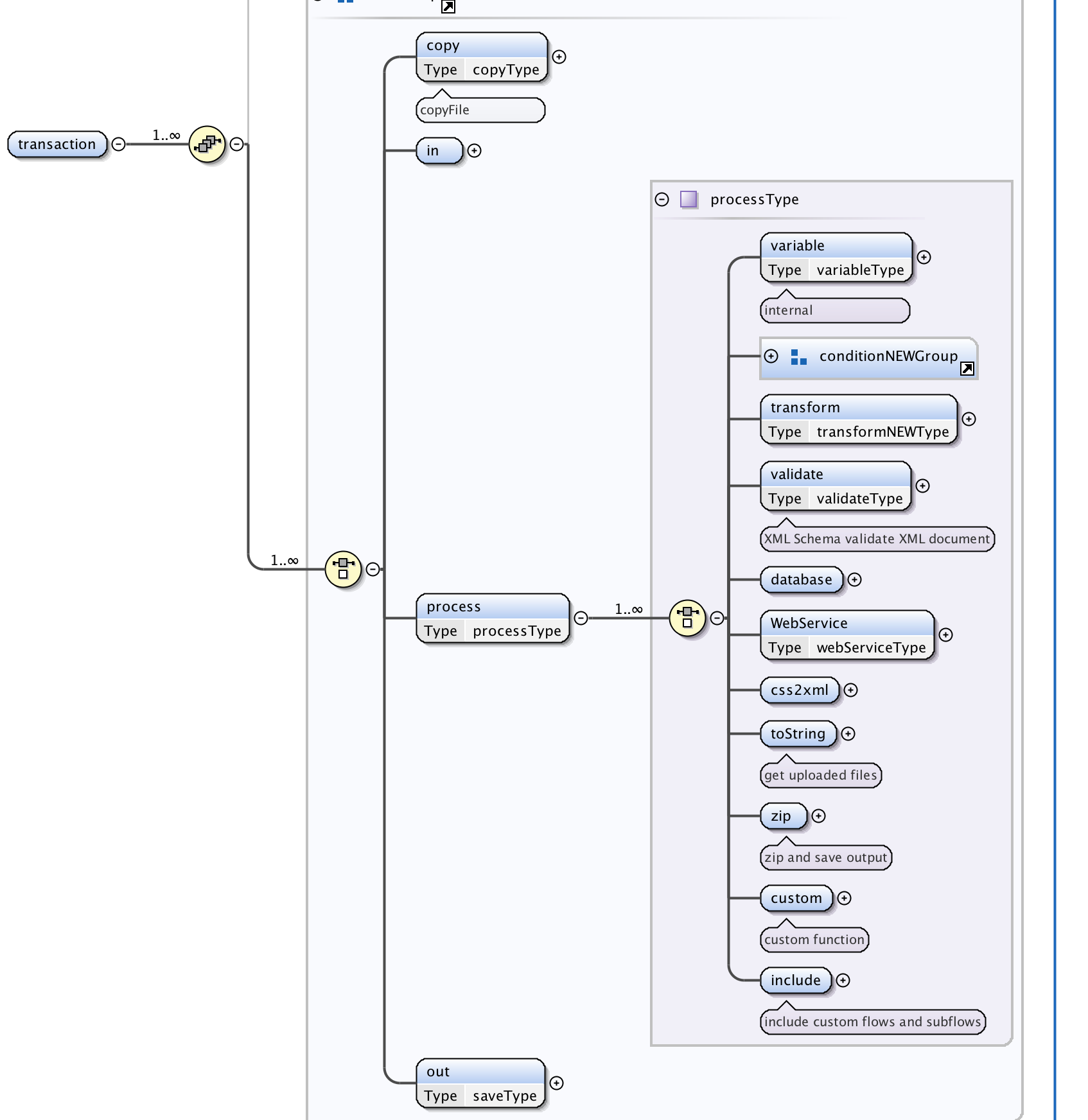
include
allowed
variable
copy
in
process
out
Send Email
The system has its own dynamic email markup language.
<?xml version="1.0" encoding="UTF-8"?>
−
<es:email xmlns:bs="http://www.bootstrap-cms.org" xmlns:bs-e="http://www.bootstrap-extensions.org" xmlns:ds="http://www.bootstrap-data.org" xmlns:sql="http://www.rapidweb.tools/sql" xmlns:es="http://www.emailstrap.org">
−
<es:to>
<es:email>info@data-diagrams.com</es:email>
<es:name>Support</es:name>
</es:to>
[2 lines]
−
<es:from>
−
<es:email>
<es:value-of select="email"/>
</es:email>
[1 lines]
−
<es:name>
<es:value-of select="name"/>
</es:name>
[1 lines]
</es:from>
[4 lines]
<es:subject>DigitalBlind Kontakt</es:subject>
−
<es:body>
−
<es:text>
<es:value-of select="name"/>
<es:crlf/>
<es:value-of select="email"/>
<es:crlf/>
<es:value-of select="telephone"/>
<es:crlf/>
<es:value-of select="nationality"/>
<es:crlf/>
<es:value-of select="message"/>
<es:crlf/>
</es:text>
[10 lines]
−
<es:html>
<h1>DigitalBlind</h1>
<h2>Bruger Spørgsmål</h2>
−
<div>
<span>Navn: </span>
<es:value-of select="name"/>
</div>
[2 lines]
−
<div>
<span>Email: </span>
<es:value-of select="email"/>
</div>
[2 lines]
−
<div>
<span>Telefon: </span>
<es:value-of select="telephone"/>
</div>
[2 lines]
−
<div>
−
<div style="border:solid 1px;padding:10px;margin-top:10px;">
−
<p>
<es:value-of select="message"/>
</p>
[1 lines]
</div>
[2 lines]
</div>
[3 lines]
</es:html>
[15 lines]
</es:body>
[27 lines]
</es:email>
[37 lines]
info@data-diagrams.com Support DigitalBlind Kontakt DigitalBlind
Bruger Spørgsmål
Navn:
Send Newsletters
The system has builtin support for publishing newsletters.
Send Notification
The system has support sending change notifications to users.
The typically notification is sent upon database updates.
Cron Jobs
Cron Jobs are made as scheduled Transaction Flows
APIs
Samples